 how-to
Design Professional Multi-Part Invoices: A Step-by-Step Guide
Table of Contents
- Understanding Multi-Part Invoices and When to Use Them
- Step 1: Plan Your Invoice Layout and Required Fields
- Step 2: Choose Your Multi-Part Invoice Template Structure
- Step 3: Select Carbonless Invoice Forms and Paper Stock
- Step 4: Design Your Invoice Form Layout for Clarity
- Step 5: Prepare Your Design for NCR Invoice Printing
- Step 6: Finalize Copy Allocation and Test Your Forms
- Cost Considerations and Quantity Planning
- Frequently Asked Questions
Last Updated: October 6, 2026
Understanding Multi-Part Invoices and When to Use Them
A multi-part invoice is a business form with two or more layers that create simultaneous copies when you write or print on the top sheet.
Multi-part invoices use carbonless paper technology: pressure on the top sheet transfers the impression to layers below, no carbon paper required.
Freelancers, contractors, small retailers, and service businesses rely on multi-part invoices because they eliminate transcription errors and save time.
If you're creating invoices manually, sending separate copies to different departments, or struggling with mismatched records, multi-part invoices solve those problems immediately.
Step 1: Plan Your Invoice Layout and Required Fields
Before designing anything, map out exactly what information your invoice needs, starting with the essentials and adding fields specific to your business model.
Essential invoice fields and tax details
Every invoice must include these core fields:
- Your business name, address, and contact details (top left or header)
- Invoice number and date (for tracking and legal records)
- Customer name and billing address (for delivery and payment routing)
- Itemized line items (what you sold or the service provided)
- Quantity, unit price, and total per line item (so calculations are clear)
- Subtotal, tax amount, and final total (required for accounting)
- Payment terms and due date (when payment is expected)
- Your payment method instructions (bank transfer, check, credit card, etc.)
Some businesses also add:
- Purchase order number (if your customers require it)
- Project or job reference (for service-based work)
- Notes or special instructions (delivery requests, warranty info)
- Your business license or tax ID (required in many jurisdictions)
Tax details matter: include your sales tax ID number for taxable goods or services, and note clearly if you're invoicing across state lines or to tax-exempt organizations. This prevents payment delays and audit issues.
Spacing and alignment for simultaneous copies
When you stack carbonless paper, the top sheet must align perfectly with every layer below. Poor spacing means the third copy is illegible or data appears in the wrong spot.
Use these guidelines:
- Leave at least 0.5 inches of margin on all sides (prevents edge blur on lower copies)
- Space line items at least 0.25 inches apart (so ink doesn't bleed between rows on copies)
- Keep text at least 0.25 inches from fold lines (carbonless paper folds can create dead zones)
- Use a grid or table structure for consistent alignment across all copies
- Test alignment with a sample print before ordering your full run
Your print shop will verify alignment during proofing, but designing with tight spacing from the start catches problems early and avoids expensive reprints.
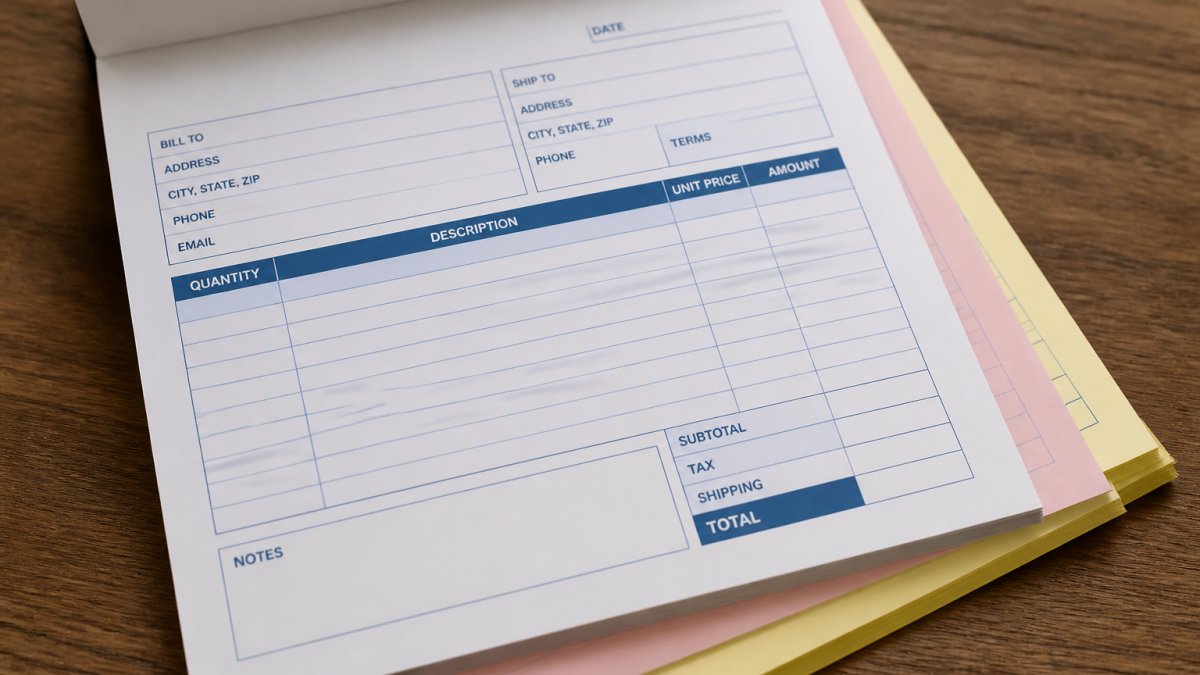
Step 2: Choose Your Multi-Part Invoice Template Structure
Decide how many copies you need and what each one does, based on your workflow and who needs records.
Two-part versus three-part forms
A two-part invoice has one original and one copy. Use this when you need minimal documentation: one for the customer, one for your files.
A three-part invoice has one original and two copies.
Most small businesses start with two-part forms: simpler, faster to fill out, and cheaper to print.
Four- or five-part forms are rare: more layers mean more writing pressure, making handwritten invoices harder to complete, though computer-printed forms handle extra layers better.
Assigning each copy to customer, business record, and accounting
Decide what happens to each copy before you print.
Copy 1 (Original, usually white): Goes to the customer. This is your sales record from their perspective. Make it professional and complete.
Copy 2 (First duplicate, often yellow or pink): Stays in your business files. Use this for order fulfillment, shipping verification, or general record-keeping.
Copy 3 (Second duplicate, often blue or green, if you need it): Goes to accounting or a separate department. Some businesses use this for tax documentation or to track payments received.
Assign colors to each copy so your team knows instantly where each one goes, preventing misfiling. When you work with American Printing Services, LLC on your custom multi-part invoice design, we help you choose colors and assign copies based on your actual workflow.
Step 3: Select Carbonless Invoice Forms and Paper Stock
Carbonless paper makes multi-part invoices work without messy carbon sheets. Understanding paper options helps you choose forms that produce clear copies.
Carbonless paper has an invisible chemical coating on the back of each sheet (except the last one).
Paper weight matters. Standard invoice paper is 20 lb bond (about 75 gsm): thick enough to handle writing pressure without tearing, light enough to fold and mail.
Choose between:
- White with colored copies (white original, yellow/pink/blue duplicates), most common and professional
- All white, clean look but harder to distinguish copies at a glance
- Colored originals, less common but works for branded invoices
The bottom copy doesn't need carbonless coating on the back since nothing prints below it, saving a small amount on paper cost.
Step 4: Design Your Invoice Form Layout for Clarity
Your design determines whether customers and your team can actually use the invoice. Clear layout beats fancy design.
Start with a grid: divide your invoice into header, customer details, line items, totals, and payment instructions. Use horizontal lines to separate sections and vertical lines to align columns, ensuring all layers align perfectly on carbonless paper.
Branding and custom design guidelines
Your invoice is a marketing touchpoint, so include your logo, brand colors, and company name prominently, but don't let branding overwhelm functionality.
Use sans-serif fonts like Arial or Helvetica for body text: easy to read in small sizes and clean on multi-part forms.
Font size should be at least 10 points for body text, 12 points for section headers. Anything smaller gets fuzzy on the second or third copy.
Leave white space. Don't pack information edge to edge.
Accessibility and legibility considerations
Design for clarity, not style.
Use high contrast: black text on white is standard.
Align text left, not centered. Left alignment is faster to scan and more professional. Centered text works for headers but not for data fields.
Keep line length reasonable. If a field spans the full width of the page, it's harder to read. Break long sections into narrower columns.
Test readability on the third copy. If it's hard to read, your customers and accounting team will struggle, so adjust font size, spacing, or ink density.
Step 5: Prepare Your Design for NCR Invoice Printing
NCR stands for "No Carbon Required", the industry standard for carbonless forms. When ready to print, provide your design in a format the print shop can use.
Print specifications and production requirements
Work with your print shop to confirm these specs:
- File format: PDF is standard. Provide a high-resolution PDF (at least 300 dpi) so text and images print sharply.
- Color mode: Use CMYK, not RGB. RGB is for screens; CMYK is for printing.
- Bleed area: Extend colors and images 0.125 inches beyond the trim line. This prevents white edges if the cutter is slightly off.
- Margins: Keep important content at least 0.25 inches from the edge.
- Paper size and orientation: Specify 8.5 x 11 inches (standard letter) or 8.5 x 7 inches (half-size), portrait or landscape.
- Number of parts: Confirm whether you want 2-part, 3-part, or another configuration.
- Ink coverage: If your design has large solid color areas, the printer may flag high ink coverage. Ask about reducing ink density to prevent smudging.
The print shop will create a proof on actual carbonless paper. Review it carefully for alignment, color accuracy, copy legibility, and overall appearance.
Proofing and color consistency verification
Proofing catches mistakes before you print thousands of copies. Don't skip it.
When you receive the proof:
- Write on it (if it's handwritten invoices) or print on it (if it's computer-printed) to test the carbonless coating
- Check all three copies for legibility and alignment
- Verify colors match your brand (bring a brand color sample if you have one)
- Confirm text is centered in fields and not cut off at edges
- Look for smudging or ink bleeding between sections
- Check that line items align across all copies
If something's off, ask the printer to adjust and send another proof. This costs a bit more but prevents expensive mistakes.
Color consistency is critical across multiple runs. Ask your print shop how they maintain it between jobs; a professional shop uses color standards and adjusts ink density to match previous runs.
Step 6: Finalize Copy Allocation and Test Your Forms
Before using your invoices, run a quick test with your team.
Print a small batch (25-50 copies) and have your team use them for real invoices. Does the form work in your actual workflow? Are the fields in the right spots?
Pay attention to:
- Ease of writing: If you're handwriting, is there enough space for names and addresses without crowding?
- Clarity of copies: Can your customer read their copy? Can your accounting team read theirs?
- Durability: Do the forms hold up when handled, mailed, or filed?
- Feedback from users: Ask your team what could be better
Use this feedback to refine your design before a larger run. Small adjustments now prevent frustration later.
Once satisfied, order your full quantity. Most print shops discount larger orders, so calculate 6-12 months of usage and order accordingly; storing extras is cheaper than rush printing.
Cost Considerations and Quantity Planning
Multi-part invoice cost depends on paper quality, number of parts, quantity, and customization.
Two-part forms are less expensive than three-part because they use less paper and simpler carbonless coating.
Calculate your annual invoice volume: 500 per year means ordering 600 to cover mistakes and reprints; 5,000 means ordering 5,500.
Designing professional multi-part invoices takes planning, but the payoff is clear: fewer errors, faster invoicing, and better records.
Frequently Asked Questions
What information should a multi-part invoice include?
A professional multi-part invoice must include your business name and contact details, invoice number and date, customer details, itemized line items with descriptions and amounts, subtotal and tax calculations, payment terms, and payment instructions. If you're filing for tax purposes, include your tax identification number and any applicable tax rates. Each copy should clearly indicate its purpose: customer copy, business record, or accounting copy. This ensures all stakeholders have the information they need and maintains compliance with business and tax records requirements.
How many copies should a multi-part invoice form have?
Most businesses use two-part or three-part forms. A two-part form provides one copy for the customer and one for your business records. A three-part form adds a third copy for accounting or accounts receivable tracking. Choose based on your workflow: freelancers and small businesses often use two-part forms, while companies with separate accounting departments benefit from three-part forms. Consider whether you need a separate copy for digital accounting software entry or if one business record copy suffices for manual filing.
What is the difference between carbonless paper and carbon paper?
Carbonless paper (also called NCR paper, No Carbon Required) uses a chemical coating on the back of each sheet to create copies automatically when you write or print on the top sheet. Carbon paper requires manual insertion between sheets and creates copies through pressure. Carbonless forms are more professional, cleaner, and faster for business invoices because they produce simultaneous copies without the mess of traditional carbon paper. They're ideal for multi-part invoices because all copies form at once, whether handwritten or computer-printed.
How do you prepare a multi-part invoice for printing?
Start by creating your design in a template or design software, ensuring all text and fields align vertically across all parts. Provide print specifications to your printer: form size, number of parts, paper stock weight, ink colors, and whether forms should be collated and perforated. Submit a PDF or high-resolution file with proper margins and bleed areas. Request a proof to verify alignment, color consistency, and copy legibility before full production. Most commercial printers require these specifications to ensure each copy is equally clear and professional when printed.