 comparison
Get Custom Business Forms Printed: 2026 Guide
Table of Contents
- What to Know Before You Get Custom Business Forms Printed
- Carbonless Forms Printing Services: How They Work and What to Order
- Multi-Part Business Invoice Templates: Design Best Practices
- Legal Compliance Checklist for Custom Business Forms
- Turnaround Time for Custom Printing: What to Expect
- Digital vs. Physical Workflow Integration for Custom Forms
- How to Order Custom Business Forms: Step-by-Step
- Conclusion
Last Updated: August 28, 2026
What to Know Before You Get Custom Business Forms Printed
Custom business forms are multi-part printed documents that create simultaneous duplicate or triplicate copies without manual recopying. Businesses relying on accurate, real-time record distribution, from field technicians writing work orders to retail staff processing returns, depend on these forms daily. At American Printing Services, LLC, we've guided operations through specifying, designing, and ordering custom business forms that perform reliably in real-world workflows.
Three decisions drive everything: how many parts you need, what paper weight and copy quality you require, and how the forms will be bound. Getting these wrong means reprinting. Getting them right means your forms work the first time, every time.
Form Types: 2-Part, 3-Part, and 4-Part Sets
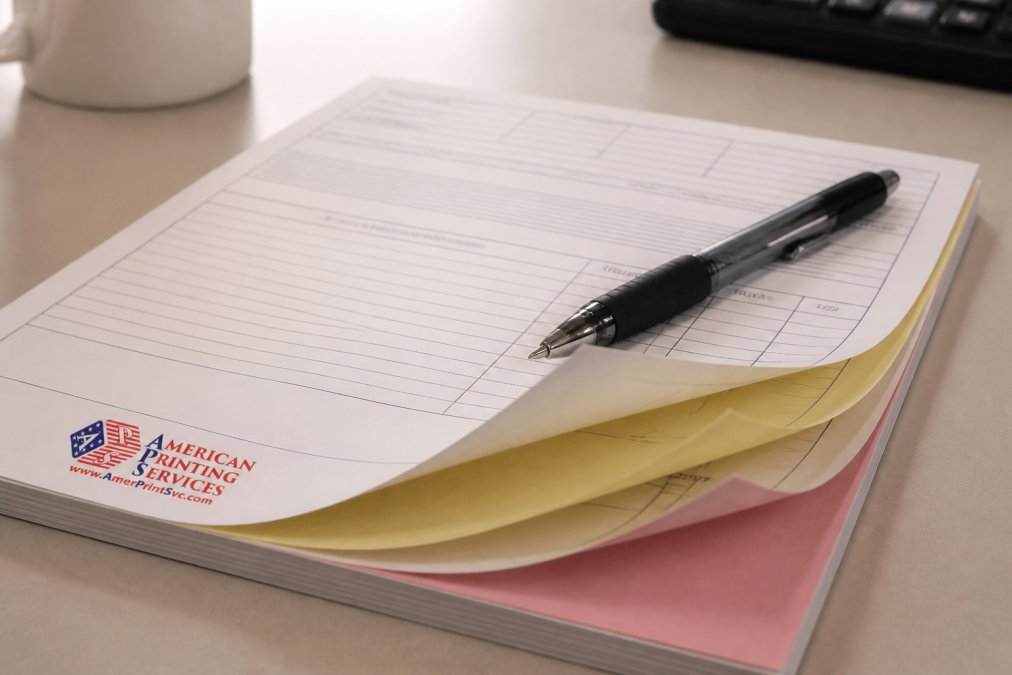
Carbonless forms, also called NCR forms (No Carbon Required), use a chemical coating between sheets to transfer writing or impact printing from one layer to the next without traditional carbon paper.
- 2-part sets produce one original and one copy. Standard for basic invoices, receipts, and simple purchase orders.
- 3-part sets produce an original plus two copies. Common for work orders, service agreements, and delivery receipts where the customer, technician, and office each need a copy.
- 4-part sets produce an original and three copies. Used in regulated industries and complex supply chains where multiple departments or external parties need simultaneous documentation.
Color-coding by layer is standard: white for the original, canary yellow for the first copy, pink for the second, and gold for the third. This visual system prevents mix-ups during rapid distribution.
Paper Weight, Copy Clarity, and Quality Specs
Paper weight directly determines copy clarity. Lighter stock transfers pressure more cleanly on the top sheet but may not survive rough field handling. Heavier stock holds up better physically but requires firmer pen pressure for clean transfer to lower sheets. Most commercial carbonless printing uses 20-24 lb stock for inner sheets, with a slightly heavier cover or back sheet for durability. For 4-part sets, the bottom sheet must still receive a legible impression, so coating chemistry and paper weight on every intermediate sheet matters.
Carbonless Forms Printing Services: How They Work and What to Order
Carbonless forms printing applies a microencapsulated dye coating to the back of each sheet and a clay-based reactive coating to the face of the sheet below. Writing or impact pressure ruptures the microcapsules, creating a chemical reaction that produces a copy. The result is clean, immediate, and requires no ribbon, carbon paper, or separate copier.
When ordering, you'll configure several variables simultaneously. Understanding each one prevents costly mistakes.
Binding and Finishing: Padded, Stapled, and Perforated Options
Padded forms are the most common format. Individual multi-part sets are collated, stacked, and glued along one edge with flexible adhesive that lets each set tear away cleanly. Padding is ideal for receipt books, invoice pads, and any form where the user tears off the set after completion.
Stapled or book-bound forms hold sets together more permanently and work well for contract forms, multi-page agreements, or situations where the entire pad needs to stay intact through a workflow.
Perforated edges allow clean separation of individual sheets within a set, particularly useful when the top copy goes to a customer on-site while remaining copies stay in the book. A common mistake is ordering padded forms when the workflow requires perforated separation, or vice versa.
Sequential Numbering for Tracking and Compliance
Sequential numbering is one of the most underused and valuable features in custom business forms. Each form receives a unique, incrementing number printed in the same position on every part, creating a traceable identifier for every transaction.
For invoices, this is often legally relevant. Many states require sequentially numbered invoices for sales tax audit purposes, and the IRS guidance on business recordkeeping requirements specifies that businesses must maintain records sufficient to support income and deduction claims. Sequential numbering directly supports this requirement and catches gaps, if form #10,047 is missing, you know a transaction went undocumented.
Multi-Part Business Invoice Templates: Design Best Practices
The biggest design mistake on multi-part business invoice templates is treating every part identically. The top copy can carry full color and detailed branding. Lower copies, which exist purely for internal record-keeping, need only clear black-and-white information. Printing full CMYK color on every part of a 4-part set adds cost without adding value.
Design for the lowest copy first. If the fourth part is legible and organized, everything above it will be too.
Branding Elements: Logo Placement, CMYK Color, and Layout
Logo placement on carbonless forms follows different logic than marketing collateral. The form is a working document, not an advertisement. Place your logo in the upper left or upper right corner, sized to identify the company without consuming space needed for data fields.
CMYK color printing on the top sheet significantly improves perceived professionalism for client-facing invoices and purchase orders. Use your brand's CMYK values, not RGB, because carbonless forms are offset or digitally printed, and RGB-to-CMYK conversion without calibration produces color shifts.
Key layout principles for readable, functional forms:
- Leave at least 3mm of clear space around every data entry field
- Use a minimum 9pt font for field labels; 11pt or larger for totals and critical identifiers
- Group related fields visually with clear section breaks
- Avoid reversed text in areas where handwriting will be added
File Requirements: Bleed, Resolution, and Upload Formats
Bleed is the extension of background colors or images beyond the trim edge, typically 3mm on all sides. Without bleed, slight shifts during cutting leave white edges that make forms look unprofessional.
Resolution for print files should be a minimum of 300 DPI at final output size. Vector files (AI, EPS, PDF with embedded fonts) are preferred because they scale without resolution loss.
Accepted upload formats include PDF/X-1a or PDF/X-4 (preferred), AI or EPS with outlined fonts, and high-resolution TIFF (300 DPI minimum, CMYK color mode). Avoid submitting files in RGB color mode, with embedded spot colors you haven't specified, or with fonts that aren't outlined or embedded.
Legal Compliance Checklist for Custom Business Forms
Custom business forms often carry legal weight. An invoice is a financial instrument. A work order is a service contract. A delivery receipt can be evidence in a dispute. The design and content must meet certain legal and regulatory standards.
According to Small Business Administration guidance on business recordkeeping, maintaining accurate, organized business records is foundational to tax compliance, liability protection, and financial management. Your forms are the front line of that recordkeeping system.
Use this checklist before finalizing your form design:
- Business legal name and address printed on every form
- Federal EIN or state tax ID included where required by your industry
- Sequential numbering enabled for invoices and purchase orders
- Payment terms clearly stated
- Sales tax fields present and correctly labeled for your state
- Signature lines included where the form constitutes an agreement
- Retention policy noted if forms are subject to regulatory audit
- Disclaimer or liability limitation language reviewed by legal counsel before printing
State-level requirements vary significantly. Consult your state's department of revenue for jurisdiction-specific invoice content requirements. The Federation of Tax Administrators state tax agency directory provides direct links to every state's tax authority.
Turnaround Time for Custom Printing: What to Expect
Turnaround time depends on form complexity, quantity ordered, and finishing options selected. Standard carbonless forms in quantities under 1,000 sets typically move through production in 3-5 business days. Larger quantities, full-color printing, sequential numbering, and custom sizes all add production time.
The turnaround clock starts after proof approval, not after order placement. This distinction matters enormously for deadline-sensitive orders.
Rush Orders, Proof Approval, and Shipping Options
Rush orders are available from most commercial printers but carry a premium and depend on current production capacity. American Printing Services, LLC's network of over 2,500 production facilities across the United States, Canada, and Mexico means rush orders can be routed to the nearest available facility with capacity, rather than queued behind existing jobs.
Proof approval is the step most buyers underestimate. A digital proof shows exactly how the form will print, colors, layout, numbering, and bleed. Reviewing it carefully takes time, and revision cycles add days. Build at least one revision round into your timeline.
Shipping options typically include standard ground (5-7 business days after production), expedited (2-3 business days), and overnight (next business day, available for most quantities under 500 sets).
| Finishing Option | Typical Add to Production Time | Notes |
|---|---|---|
| Sequential numbering | +1 business day | Applied during bindery |
| Perforated edges | +1 business day | Requires bindery pass |
| Padded binding | Standard (included) | Most common format |
| Stapled/book-bound | +1-2 business days | Requires collation and binding |
| Full-color top sheet | Standard for digital printing | Offset may add 1 day for setup |
| Custom size | +1-2 business days | Requires custom die or cut setup |
Digital vs. Physical Workflow Integration for Custom Forms
The most overlooked question when ordering custom business forms is how they connect to your digital systems. A form that exists only as a physical artifact creates a data entry bottleneck: someone has to manually transcribe the information into your CRM, ERP, or accounting software after the fact.
Smart form design reduces that friction. QR codes on forms link to digital submission portals. A technician completes a paper work order, the customer scans a QR code on their copy to confirm receipt, and the confirmation is logged digitally in real time. Pre-printed data fields that match your software's import format allow batch scanning and OCR processing. Sequential numbering as a digital key means every physical form maps to a unique record in your system.
As SCORE's small business operations resources note, businesses that integrate physical documentation with digital systems reduce administrative errors and speed up billing cycles.
How to Order Custom Business Forms: Step-by-Step
Ordering custom business forms is straightforward when you approach it in sequence. Skipping steps, particularly proof review, is the most common source of reprints and delays.
Step 1: Define your form specifications [Time: 30 minutes] Determine the number of parts (2, 3, or 4), the quantity of sets, the finished size, and the binding method. Confirm whether you need sequential numbering, perforated edges, or custom color on specific parts.
Step 2: Prepare your design file [Time: 1-3 hours] Build your form in your preferred design application. Export as a PDF/X-1a or high-resolution PDF with 3mm bleed on all sides, 300 DPI resolution, and all fonts outlined. Confirm CMYK color mode.
Step 3: Select your printer and upload your file [Time: 15 minutes] Choose a commercial printer with demonstrated carbonless forms experience. Upload your file and complete the order configuration.
Step 4: Review the digital proof [Time: 30-60 minutes] Check every field, every line of text, the sequential number starting point, bleed coverage, and color values. Do not approve a proof you haven't read completely.
Step 5: Approve and confirm shipping details [Time: 10 minutes] Approve the proof, confirm delivery addresses, and note the expected ship date. Save your order confirmation and proof approval email.
Step 6: Receive and verify your order [Time: 20 minutes] When forms arrive, check a sample from the top, middle, and bottom of the stack. Write on a test set and verify that all copies, including the bottom sheet, are legible. Report any quality issues immediately.
| Step | Action | Time Required |
|---|---|---|
| 1 | Define specifications | 30 minutes |
| 2 | Prepare design file | 1-3 hours |
| 3 | Upload and configure order | 15 minutes |
| 4 | Review digital proof | 30-60 minutes |
| 5 | Approve and confirm shipping | 10 minutes |
| 6 | Receive and verify quality | 20 minutes |
The total elapsed time from order placement to delivery ranges from one week for standard orders to 2-3 weeks for complex, high-quantity, or multi-location shipments.
Getting the specifications right before you get custom business forms printed saves time, money, and the operational disruption of a reprint. The details, paper weight, binding method, sequential numbering, bleed, and legal field requirements, compound quickly, and a missed spec on a 5,000-set order is an expensive lesson. American Printing Services, LLC brings over 20 years of commercial printing experience and a network of more than 2,500 production facilities to every order, ensuring consistent quality, reliable turnaround, and nationwide delivery for operations of any size. Get started with American Printing Services, LLC and receive precision-crafted custom business forms that work the first time, every order.
Frequently Asked Questions
What is the difference between 2-part and 3-part carbonless forms?
A 2-part carbonless form (NCR form) produces one original and one copy, white on top, canary yellow beneath. A 3-part set adds a third sheet, typically pink, giving you an original plus two copies. Use 2-part for simple receipts or delivery confirmations. Choose 3-part when a transaction needs three parties to retain records, for example, a customer, a driver, and your accounting department. 4-part sets add a fourth copy, often gold, for high-documentation workflows like regulated service contracts.
Can I get custom NCR paper printed with my logo and branding?
Yes. Custom business forms printed on carbonless NCR paper can include your logo, business name, address, and brand colors in CMYK. Most commercial printers accept print-ready files in PDF, AI, or EPS format at 300 DPI with proper bleed. Sequential numbering and perforated edges are also available. Branding elements print on the top sheet and show through to copies at varying intensity, so keeping critical text in high-contrast areas improves copy clarity across all parts.
How long does it take to get custom business forms printed?
Turnaround time for custom printing varies by provider, quantity, and finishing options. Standard production for carbonless forms typically runs 4-7 business days after proof approval, with shipping time added on top. Rush production options can shorten that window significantly. Factors that extend timelines include complex die-cutting, sequential numbering, and large bulk orders. Submitting print-ready files and approving your digital proof quickly is the single fastest way to reduce total lead time.
Is it cheaper to get custom business forms printed in bulk?
Yes, bulk printing consistently lowers the per-unit cost for custom business forms. Setup and plate costs are fixed regardless of quantity, so spreading them across a larger run reduces what you pay per form. Ordering 1,000 sets rather than 250 can cut the per-set price substantially. If your business uses the same invoice or work order form consistently, printing in larger quantities is almost always the more cost-effective approach. Check the pricing page for current quantity-based rates.
What information should be included on a professional invoice form?
A professional invoice form should include your business name, address, phone number, and logo; a unique sequential invoice number; the date of issue and payment due date; an itemized list of products or services with quantities and unit prices; subtotal, applicable sales tax, and total amount due; accepted payment methods; and any relevant terms and conditions. For regulated industries, additional fields may be required under applicable federal or state law. Sequential numbering is especially important for audit trails and IRS recordkeeping requirements.
This article was written using GrandRanker